
Help Center
ImagineTime 18.1001 Update
An update to ImagineTime is available, and is recommended for all users. Firms who process credit cards or use Due Dates are required to update in order to continue using these features.
Updating ImagineTime
The steps to update depend on what version of ImagineTime is currently installed.
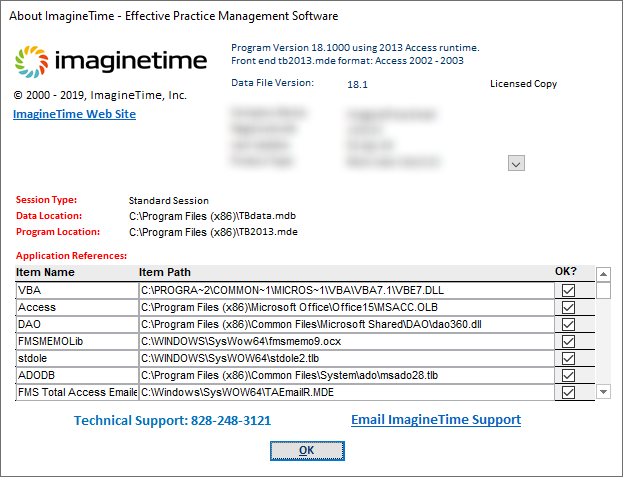
- Open ImagineTime and click the ImagineTime logo to display the About window.
…or…
On the File ribbon, click About ImagineTime. - Verify that the Program Version is “18.1000 using the 2013 Access runtime” and Data File Version is “18.1.” Verify the following information before proceeding to step 3.
- If the Program Version and Data File Version values do not match, contact Mango Support for additional assistance. Information on contacting Mango Support can be found in the Frequently Asked Questions article.
- If the Program Version is not 18.1, you must update to Version 18.1 before updating to 18.1001. Uninstall the older version of ImagineTime, and then install Version 18.1. Information on the installation process can be found in the Installing ImagineTime article.
- If any other runtime is installed (2007, 2010, or 2016 runtime), contact Mango Support for additional assistance.
- Have all users exit ImagineTime.
- Contact Mango Support and request the Version 18.1001 update. An email will be sent to you containing the necessary files.
- Download the TB2013.MDE file from the email.
- Using Windows Explorer, copy TB2013.MDE from your Downloads folder and paste to C:\Program Files (x86)\ImagineTime, replacing the existing file.
- Open ImagineTime.
- Verify the Database Path and click OK. ImagineTime will link the database and close.
If you are using ImagineTime on multiple workstations, copy the TB2013.MDE file to your server and repeat steps 6-8 above for each workstation.
Learn More
The following knowledge base articles contain additional information relating to updating ImagineTime: